#___________________________----
# SET UP ----
# An analysis of the bill dimensions of male and female
# Adelie, Gentoo and Chinstrap penguins

# Data first published in  Gorman, KB, TD Williams, and WR Fraser.
# 2014.
# “Ecological Sexual Dimorphism and Environmental Variability
# Within a Community of Antarctic Penguins (Genus Pygoscelis).”
# PLos One 9 (3): e90081.
# https://doi.org/10.1371/journal.pone.0090081.
#__________________________----

# PACKAGES ----
library(tidyverse) # tidy data packages
library(here) # organised file paths
library(janitor) # cleans variable names
#__________________________----

# IMPORT DATA ----
penguins_raw <- read_csv(here("data", "raw", "penguins_raw.csv"))

# check the data has loaded, prints first 10 rows of dataframe
penguins_raw
#__________________________----

# CLEAN DATA ----

# clean all variable names to snake_case
# using the clean_names function from the janitor package
# note we are using <-
# to overwrite the old version of penguins
# with a version that has updated names
# this changes the data in our R workspace
# but NOT the original csv file

# clean the column names
# assign to new R object
penguins_clean_names <- janitor::clean_names(penguins_raw)

# quickly check the new variable names
colnames(penguins_clean_names)

# shorten the variable names for N and C isotope blood samples

penguins_clean_names <- rename(penguins_clean_names,
         "delta_15n"="delta_15_n_o_oo",  # use rename from the dplyr package
         "delta_13c"="delta_13_c_o_oo")

# use mutate and case_when for a statement that conditionally changes the names of the values in a variable
penguins <- penguins_clean_names |>
  mutate(species = case_when(species == "Adelie Penguin (Pygoscelis adeliae)" ~ "Adelie",
                             species == "Gentoo penguin (Pygoscelis papua)" ~ "Gentoo",
                             species == "Chinstrap penguin (Pygoscelis antarctica)" ~ "Chinstrap"))

# use mutate and case_when to correct typos
penguins <- penguins |>
  mutate(sex = case_when( sex == "MALE" ~  "Male",
                          sex == "FEMALE" ~ "Female"
                          .default = as.character(sex)
  )
  )

# use lubridate to format date and extract the year
penguins <- penguins |>
  mutate(date_egg = lubridate::dmy(date_egg))

penguins <- penguins |>
  mutate(year = lubridate::year(date_egg))


# WRITE CLEAN DATA ----
## Optional ----

write_csv(penguins, here::here("data", "clean", "penguins_clean.csv"))13 Scripts
13.0.1 Writing a script
An R script is a plain text file containing R code that can be run from top to bottom. Scripts allow analyses to be reproduced from a blank R session, shared with others, and rerun without manual intervention. In this tutorial, you will save, run, and check a simple data import and cleaning script.
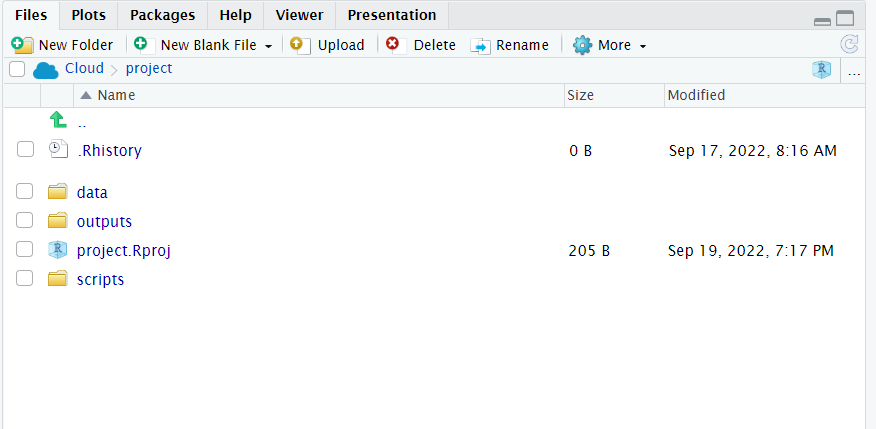
Your turn
Does your workspace look like the below?

13.1 Running a script from console
Now that we have made an import and cleaning script, we can check our blank slates set-up and that our script runs without errors:
13.2 Essential shortcuts
-
Comment/uncomment -
Ctrl/Cmd + Shift + c- Highlight text and use shortcut keys to commment out text
-
Rename in scope -
Ctrl/Cmd + Alt + Shift + M- Highlight an R object then use this shortcut key to rename all examples in the script
13.3 Layout
Define logical regions of scripts with either
----or====after#This uses markdown logic, #, ##, ### to define titles, headers and subheaders
Use
stylerto help format code and keep it neat
13.4 Reading
Well-commented and clearly structured scripts make analytical decisions explicit and allow analyses to be rerun, checked, and modified reliably. This supports reproducibility by ensuring that results do not depend on undocumented assumptions or hidden steps ).
Clear sectioning and brief comments also reduce cognitive load, making it easier to understand program flow and to identify and fix errors when scripts are run from a blank R session. For these reasons, using consistent headings, logical ordering, and concise comments is an essential part of writing reliable R scripts.